
How to Check Your YCMOU Exam Results: A Simple Step-by-Step Guide

Finding your Yashwantrao Chavan Maharashtra Open University (YCMOU) exam results is straightforward. This guide will walk you through the process, ensuring you can quickly access your scores online without unnecessary hassle.
Step-by-Step Guide to Checking Your YCMOU Results
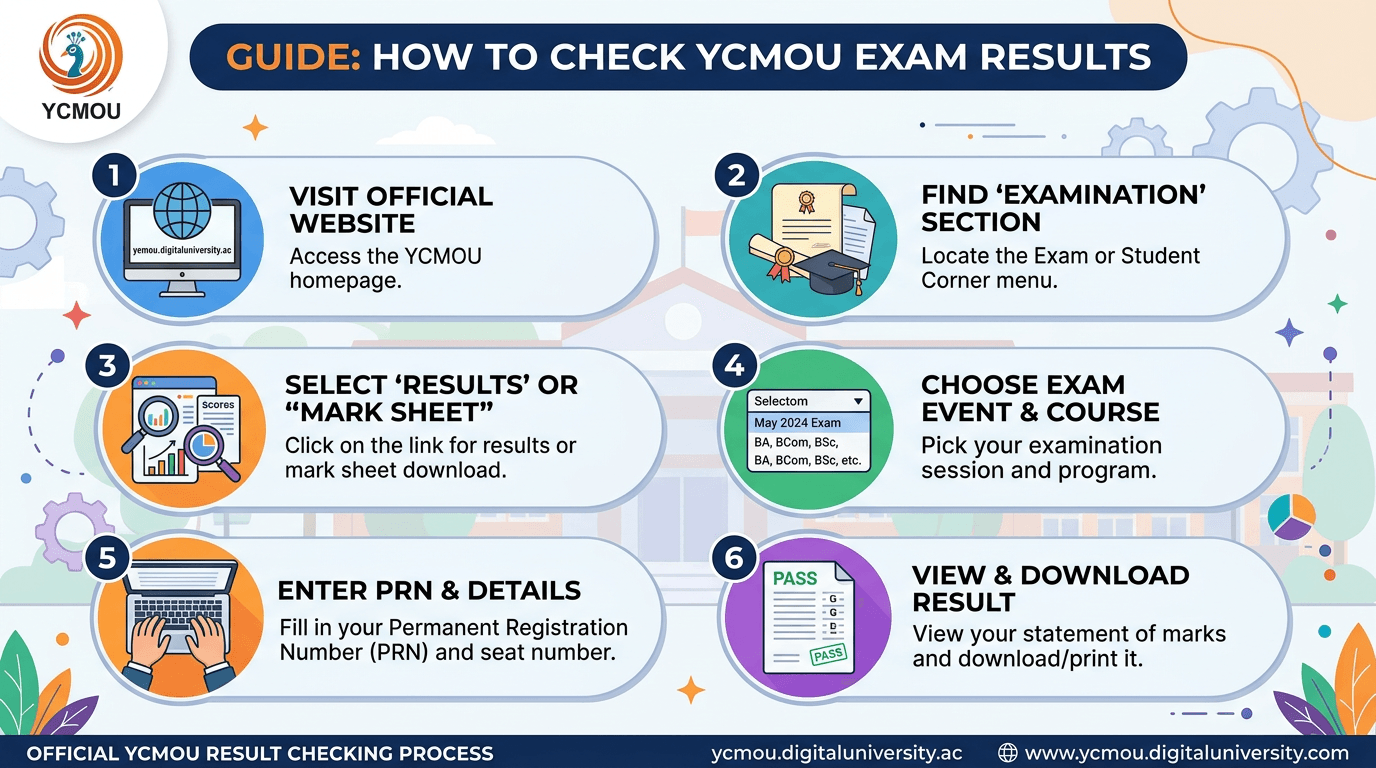
- Step 1: Visit the Official YCMOU Website. Always begin by navigating to the official university portal. The correct address is here. Exercise caution and avoid unofficial or third-party websites for result checking.
- Step 2: Locate the ‘Results’ or ‘Examination’ Section. Once on the homepage, look for a prominent link or menu item labeled ‘Results’, ‘Examination’, ‘Student Corner’, or ‘Latest News/Updates’. This section is typically found in the main navigation bar, a sidebar, or within a dedicated ‘Quick Links’ area.
- Step 3: Find Your Specific Result Link. Within the results section, you will see a list of recently declared results. Identify and click on the link that corresponds to your exact program/course name and examination session (e.g., ‘B.A. Semester II – Winter 2023 Results’ or ‘M.Sc. Part I – Summer 2024 Results’).
- Step 4: Enter Your Details. Clicking on your specific result link will usually direct you to a new page where you must enter your credentials. You will most likely need your PRN (Permanent Registration Number) or Enrollment Number and potentially your Mother’s Maiden Name or Date of Birth for verification. Ensure all details are entered accurately to avoid errors.
- Step 5: View and Download Your Result. After successfully submitting your details, your result will be displayed on the screen. Carefully review your marks and grades. You will typically find an option to ‘Print’ or ‘Download’ your result/marksheet. It is highly recommended to save a digital copy (PDF) and/or print a physical copy for your personal records.
Important Tips for YCMOU Students
- Verify the Link: Always double-check that you are on the official YCMOU website before inputting any personal information.
- Browser Compatibility: If you encounter issues viewing your results, try accessing the page using a different web browser (e.g., Google Chrome, Mozilla Firefox, Microsoft Edge).
- Stable Internet Connection: Ensure you have a reliable internet connection for an uninterrupted experience.
- Keep PRN Handy: Your Permanent Registration Number (PRN) is essential for accessing most student services, including result checks. Keep it stored safely and accessibly.
- Official Announcements: Stay informed by paying attention to official announcements from YCMOU regarding result declaration dates and any specific instructions they might provide.
- Contact Support for Issues: Should you face technical problems or identify discrepancies with your result, contact the YCMOU examination department directly through their official channels. Contact information is usually available on the university’s ‘Contact Us’ page.
Congratulations on completing your exams. Following these steps will help ensure a smooth process in checking your YCMOU scores.